Criminal Records in Hudson County can be retrieved in minutes through an online criminal record lookup that pulls arrest logs, offense types, and case status from the state judiciary database. Users may query by name, date of birth, or case number, instantly seeing misdemeanor or felony classifications, court dispositions, and sentencing details. This fast Hudson County criminal record search eliminates long‑wait phone calls and provides a certified copy request option for legal or personal use.
Criminal Records available to the public include certified copies of court filings, arrest information, and conviction history, while sealed or expunged files remain restricted. The Hudson County official criminal records portal lists processing fees, typical turnaround times, and steps to verify mismatched names or missing entries. By understanding how to request a certified criminal record and what details appear—such as sentencing, probation, or incarceration—searchers gain confidence that the information they receive is reliable and ready for immediate use.
How to Search Criminal Records
Criminal records tied to Hudson County can include cases filed in county municipal courts and cases handled by the New Jersey Superior Court. An official case-status search may show the court including verified hudson county resources and case number, party name, charges, hearing dates, disposition, and sentence for cases entered into the judiciary’s search system The search helps a person locate a case and check its court history; it does not create a certified copy. Record coverage varies because some files are not online, some are restricted, and police custody data comes from a different source.
Official Search Portal: https://ecourts.njcourts.gov/
Steps to Search
- Open the New Jersey Judiciary eCourts site and choose the public criminal case or case-status search offered on the page.
- Enter the full case number when it is available. If the form offers a party-name field, use the person’s full legal name and preserve any middle name, initial, or suffix shown on the case.
- Use the court or jurisdiction filter when available. This helps separate cases handled by a Hudson County municipal court from cases filed in the New Jersey Superior Court.
- Open each plausible result and compare the court, case number, party name, event dates, charges, and current status before relying on it.
- Use the search display as a finding tool. To obtain an official document, follow the clerk’s copy-request process and confirm that the requested copy will be certified.
Where Hudson County Criminal Records Come From
A criminal record is not one universal file. It may combine court filings, arrest data, custody history, and a fingerprint-based criminal history request. Each source comes from a different office and serves a different purpose. A Hudson County criminal record lookup should identify which source supplied each fact rather than treat every displayed entry as a proven conviction.
Court records answer case-law questions such as what charge was filed, how the court ruled, and what sentence followed. Arrest records describe a police event. Custody records describe time spent in jail. A background check may combine several sources for an employer or another permitted user. Recognizing those differences prevents a searcher from treating an arrest, a pending charge, or a jail stay as proof of a conviction.
Offense Details and Case Status
A case-status result can give a short history of the court matter. The exact fields depend on the court, the age of the case, and the record system that holds it. Reading the charge, event date, disposition, and sentence together gives a more accurate account than looking at a single label.
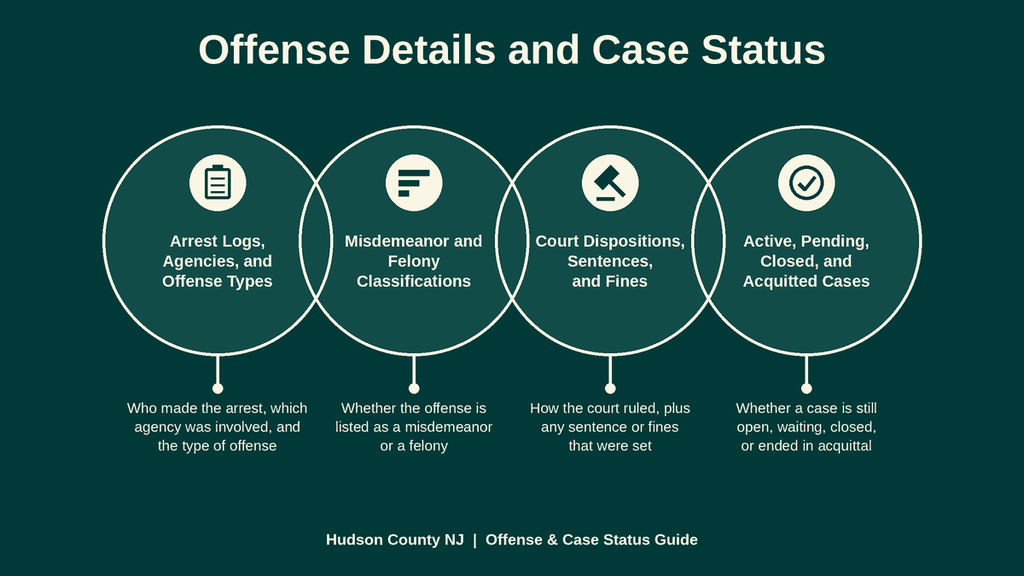
Arrest Logs, Agencies, and Offense Types
An arrest is a police action that brings a person into custody. A court case follows only when a court or prosecuting authority formally charges the person. A case file may identify the prosecuting authority, municipal court, or law-enforcement agency connected with the charge. It may also show later actions that changed the charge, such as a withdrawal, amendment, or added offense.
Court indexes do not contain every police report, field interview, booking sheet, or arrest log. An arrest record and a court case can have different case numbers because each office assigns its own identifier. Some arrest data is restricted by state law or agency policy. For that reason, a missing arrest entry in a court search does not prove that no arrest occurred.
The offense type in a court result may represent the charge as filed at a particular event. It may not be the final adjudicated offense. A later docket entry can state that a charge was amended, reduced, dismissed, or resolved after a plea. Reading the event dates beside each charge gives the correct sequence of the case.
Misdemeanor and Felony Classifications
New Jersey uses felony, misdemeanor, disorderly persons, and other statutory categories. A felony can carry a state prison sentence. A misdemeanor can carry county jail, a fine, or both, subject to the law that created the offense. Municipal-court cases often involve misdemeanors, disorderly persons offenses, local ordinances, and traffic-related criminal charges.
A search result may show several different labels for the same case because the charge, the legal classification, and the court jurisdiction are separate details. The charge name describes the alleged conduct. The classification reflects the criminal statute. The court location reflects where the case is being handled. A person cannot be judged guilty merely because a felony or misdemeanor charge appears in a search result.
A dismissed charge can remain visible in the court history because the file documents what was filed and what happened next. That entry alone does not establish guilt. Removal from ordinary public view through expungement is a separate legal process with its own order and court record.
Court Dispositions, Sentences, and Fines
A disposition records the court’s legal outcome. Common outcomes include dismissal, a not-guilty finding or acquittal, a conviction after a plea or trial, and other actions permitted by the court. The disposition should be read with the date and the related sentencing or judgment entry. A case marked closed may still have later activity involving collections, an appeal, or post-judgment obligations.
A sentence can include incarceration, probation, community service, restitution, a fine, or court costs. Some cases combine several parts. A term of incarceration shows that the court imposed confinement; it does not show where the person is held now. Custody status comes from the jail or agency that supervises the person.
A fine listed in a judgment is an amount ordered by the court. It does not by itself show whether the amount has been paid. Some courts place payment details in a separate collection system, so the case screen may not contain a current balance. Ask the clerk which office handles an unpaid fine or payment receipt for the specific case.
Active, Pending, Closed, and Acquitted Cases
Status labels can differ between municipal-court and Superior Court records. A pending case still has an unresolved charge or court action. An active case may have a future hearing, filing, or other scheduled event. A closed case has reached a recorded endpoint, but closure does not erase the file or settle every related financial matter.
An acquittal or not-guilty finding records that the court did not convict the person on the stated charge. A dismissal records a different court outcome, and some dockets state whether the dismissal bars a later filing under the same circumstances. The exact wording in the disposition field controls.
Dismissal, acquittal, and expungement have different legal effects. A dismissal or acquittal normally leaves a visible court history. Expungement may restrict or remove qualifying material from ordinary public searches after a court grants the requested relief. This difference matters when an employer, landlord, lender, or other permitted user asks about the full history.
Public Court Records and Certified Copies
New Jersey court records are open to public inspection under court rules, subject to legal exceptions. Rule 1:36 of the New Jersey Rules of Court establishes the public-inspection rule for court records. Sealed records, juvenile matters, expunged records, and documents protected by another law can have different rules. A public search result can confirm the existence and history of a case without giving the public every filed document.
Public Court Directory and File Coverage
The official Hudson County court page is https://www.njcourts.gov/courts/vicinages/hudson. Use it to confirm the Hudson Vicinage, review the courts serving the county, and locate the proper court office. A criminal case may belong to a municipal court even when the person lives elsewhere in Hudson County. The county shown on a personal profile is not proof of the court that handled the case.
The eCourts search can expose basic case data and selected docket entries. Older records, uploaded exhibits, sealed filings, and documents stored outside the case index may be missing. Some municipal-court data may also use a separate public directory. The case-status display should never be treated as a complete file archive.
A case number provides the cleanest route to the correct record. When a case number is unavailable, a criminal records by-name search can produce several people with the same name. The court name, event date, and other facts shown on the result must match before the entry is connected to a particular person.
Sealed, Expunged, and Juvenile Records
Sealed case material has been restricted by a court order or by law. A sealed filing may remain connected to a visible case number referencing verified criminal history records and while the document itself stays unavailable to the public Depending on the order, a party, attorney, law-enforcement agency, or another authorized person may request permission to view it. The court clerk can explain the process for a particular case.
Expungement is a legal process that permits qualifying criminal records to be removed from ordinary public view under New Jersey law, including N.J.S.A. 2C:23-5. A court order and the type of record control the result. Some expunged material may no longer appear in a public case search, while related law-enforcement retention rules can operate separately.
Juvenile records carry separate confidentiality protections. A juvenile case may not appear in an ordinary adult criminal search, and a juvenile disposition should not be read as an adult conviction without checking the record’s age and status. New Jersey law allows limited exceptions involving particular agencies, proceedings, or people, but the court decides whether a specific record can be disclosed.
Court and Law Enforcement Requests
The court clerk handles case filings, docket entries, judgments, and certified copies for the court that accepted the case. A police department or sheriff’s office handles arrest reports and police incident data. A jail handles custody records. A New Jersey State Police criminal history request handles fingerprint-based history for a named person through a separate process. The official State Police page for that service is https://www.nj.gov/njsp/investigations/criminal-history-records.html.
The State Police request process has its own identification, authorization, fee, and service rules. It should not be confused with an eCourts case search. A requester who needs a complete criminal history for a permitted purpose should follow that official process rather than assume an online court result contains every arrest or conviction from every jurisdiction.
Third-party criminal records online can help organize public data, and such a site may offer searches by name, date of birth, or case number. Its output is not automatically an official court record. A private lookup may also lack sealed, expunged, juvenile, or historical entries. Use the judiciary and the responsible agency as the sources for decisions that require proof.
Certified Copies, Charges, and Processing Times
A search screen helps locate a case. A certified copy serves a different purpose because the court clerk authenticates the document for use under the rules that apply to that copy. Tell the clerk which document you need before paying, since a full file, a judgment, a docket page, and an expunged file are different requests.
Certified-copy charges and processing times vary by court, document, request method, and payment method. The Hudson County court source does not supply a fixed charge or completion time for every document, so confirm both with the clerk before ordering. A PDF label or a printed screen image does not prove certification. Look for clerk authentication, a seal, a signature, or another proof named by the recipient of the document.
Ask the person receiving the document what they require. Some recipients need a current certified judgment, while others need a full docket, an arrest document from a police agency, or a State Police history response. Keep the request receipt and the delivered document together. That practice makes it easier to confirm which court supplied the copy and when it was issued.
Name, Date of Birth, and Case Number Checks
A criminal record search by name is useful when no case number is known. The strongest matching key is still the case number. A date of birth can separate people with similar names, but the public court search may not offer a birth-date field. The State Police request process asks for personal identifiers so it can match a request with fingerprint-based records.
Search Fields That Reduce False Matches
- Full case number: Copy every letter, number, suffix, and prefix from the court notice or prior record.
- Exact legal party name: Use the name shown on the court document, including any middle initial or suffix that appears there.
- Date of birth: Use it as a matching fact when the service accepts it, and compare it with any birth year or age shown in the result.
- Court and jurisdiction: Confirm that the result belongs to the municipal court or Superior Court that handled the matter.
- Filing, hearing, or event date: A nearby date can narrow the list, but an exact date is not always the filing date shown by the court.
A name field may not accept every punctuation mark or spacing choice. Try the name as it appears on a legal document, then try a documented variation such as a full middle name instead of an initial. Do not combine two unrelated names in one search. Each field should describe the same person or case.
Differentiating Similar Name Matches
Two people may have the same full name, and one person may appear under a legal name that differs from a nickname or another older record. Compare several facts before linking a result to a person. The court name, case number, event dates, party role, charge, and disposition should form a consistent account.
Birth date is helpful when it is available, but it is not a permanent, exclusive identifier. Some case records show only part of a birth year or omit it. Address history can also be dated or shared. Avoid treating one matching fact as proof that a case belongs to the person being checked.
Keep separate search results separate until the official file confirms the connection. If two entries have similar names but different courts, case numbers, or event histories, they may represent two people. A certified copy can settle a disputed match because it includes the court’s record and certification for the identified case.
Record Accuracy, Delayed Updates, and Missing Results
Online records depend on data entered and maintained by each court or agency. A clean result can mean that no matching case was found, but it can also reflect a search error, a missing index entry, or a legal restriction. A listed record can be accurate for the event shown while lacking a later update. Verification depends on the court file and the date of the record.
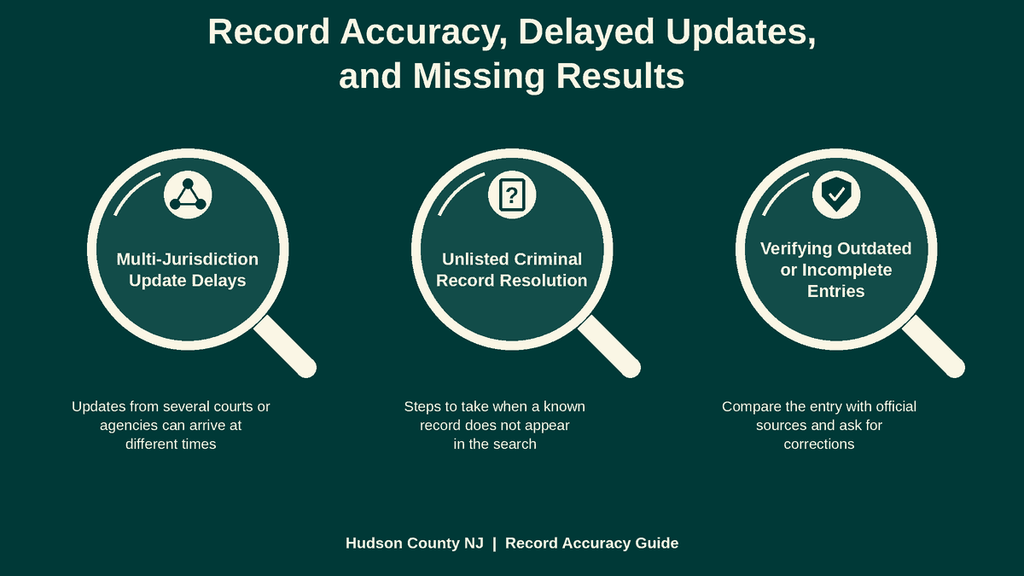
Multi-Jurisdiction Update Delays
An eCourts entry appears after court staff enter or transmit the event. The public display is not a live feed from every police agency, jail, prosecutor, or court. A recent disposition may take time to reach the online index. Systems operated by separate court jurisdictions can also update on different schedules.
A case may involve more than one docket without being a duplicate. A municipal-court case can be followed by a Superior Court prosecution, appeal, or related enforcement proceeding. The original case number may remain unchanged after later activity occurs in another court. Search results should therefore be organized by court and case number rather than by name alone.
Sealing and expungement can create a short gap between a court order and an online change. The same issue can affect a case that has moved to a collection office. If the visible entry conflicts with a later legal event, request a certified copy or ask the clerk whether the docket has a pending update.
Unlisted Criminal Record Resolution
Confirm the court before searching again. A Hudson County address does not always identify the court venue, and criminal charges may have started in a municipal court outside the county. The official county directory and the court shown on any related notice provide the correct starting point.
Search the complete case number without adding spaces or changing prefixes. If that fails, check the name format used in the court record. Compare each result by court, party name, date, charge, and disposition. Search both the New Jersey Superior Court and the municipal-court system that could have handled the matter.
If the court confirms a case that the public index omits, request the docket or a certified document from that clerk. Give the case number and enough identifying facts to locate the file. If the problem concerns an arrest rather than a court case, ask the arrest agency about its record process. A request for fingerprint-based history belongs with the New Jersey State Police service.
Verifying Outdated or Incomplete Entries
A court display can show the date of a hearing or disposition without showing the date that the record was last updated. Check for newer entries rather than assuming the visible result is current. A sentence or fine can also have later developments outside the main case display.
Compare an online result with the certified document when the matter affects a legal deadline, employment decision, housing decision, insurance, licensing, or another high-stakes use. The certified copy establishes what the court issued, while the clerk can confirm whether a later order exists. Do not rely on an uncited private summary when the receiving party asks for an official record.
If a result appears wrong, preserve the case number and the exact disputed entry. Send those details to the clerk for the court listed on the record. A clear dispute is easier to resolve than a general claim that a criminal record is inaccurate.
Contact Information
For a case handled by the New Jersey Superior Court in Hudson County, contact the Hudson Vicinage and provide the case number and party name. The court can confirm the proper clerk and current procedure for certified copies or court-record requests.
- New Jersey Superior Court, Hudson Vicinage
Hudson County Administration Building: 595 Newark Avenue Jersey City, NJ 07306 - Main court phone: (201) 748-4400
- Office hours: Monday through Friday, 8:30 a.m. to 4:30 p.m.
Frequently Asked Questions
Criminal records in Hudson County help people verify legal history, confirm identity, and protect safety. Accessing these records online saves time and avoids unnecessary trips to the courthouse. The official New Jersey Judiciary system supplies up‑to‑date case details, charges, and outcomes. Knowing how to request or search these files ensures accurate results and prevents costly mistakes.
How can I search Hudson County criminal records by name?
Visit the New Jersey Judiciary website and select the Hudson Vicinage portal. Enter the full name, then choose the “Criminal case search” option. The system returns case numbers, filing dates, and charge summaries. Review each entry to confirm relevance. If a record matches, note the case number for deeper inquiry or to request a certified copy. This method works for most adult records.
What steps are needed to request an official criminal record copy in Hudson County?
First, locate the case number using the online search. Next, call the Hudson County Administration Building at (201) 748‑4400 to confirm fee and required ID. Then, complete the request form available on the NJ Courts site and submit it by mail or in person. Finally, pay the processing fee; the office will mail the certified copy within ten business days.
Can I find criminal case status using a case number?
Yes. Input the case number in the “Case‑status search” field on the Hudson Vicinage page. The result shows the current disposition, upcoming hearing dates, and any sentences imposed. This view does not replace a formal record request but offers quick insight into case progress.
How do I locate misdemeanor or felony charges for a specific date of birth?
Start with the online criminal record search and choose “Date of birth” as the filter. Add the full birth date, then run the query. The system lists any matching misdemeanor or felony entries, including charge descriptions and court outcomes. Use the displayed case numbers to request full documents if needed.
What should I do if a criminal record appears missing or outdated?
First, double‑check spelling and date inputs. If the record still does not appear, contact the Hudson County court clerk to verify that the case is in the public system. Sometimes recent convictions take a few weeks to upload. If the record is sealed or expunged, it will not show in public searches, and you must follow the court’s sealed‑record request process.